
Download Zyro – Free AI‑Powered Website Builder for Windows, Mac, Android & iOS
Overview
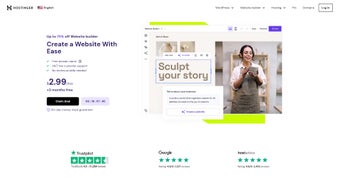
Zyro is a cloud‑based website builder that promises to turn anyone—whether a freelancer, small‑business owner, or budding entrepreneur—into a professional web designer without writing a single line of code. Launched by the creators of Hostinger, Zyro blends an intuitive drag‑and‑drop interface with a suite of AI tools that accelerate content creation, branding, and e‑commerce setup. The platform offers a library of designer‑crafted templates that are fully responsive, meaning your site will look great on desktop, tablet, and mobile devices automatically.
What sets Zyro apart from other builders is its focus on speed: you can launch a polished site in minutes, not days. In addition to the visual editor, Zyro includes a Content Generator for blog posts, an Image Background Remover for clean visuals, and an AI‑powered Slogan Generator that helps you craft memorable taglines. For online stores, Zyro provides inventory management, secure payment gateways, and shipping integrations that cover more than 40 countries.
SEO tools are built in, allowing you to edit meta tags, generate XML sitemaps, and integrate Google Analytics with a few clicks. Customer support is available 24/7 via live chat, and the platform constantly rolls out updates to keep pace with the latest web standards. Whether you need a simple portfolio, a local service site, or a full‑featured e‑commerce store, Zyro positions itself as a one‑stop solution that is both affordable and secure.
Key Features
- AI Content Generator: Quickly produce SEO‑friendly copy for pages, blogs, and product descriptions.
- AI Image Background Remover: Clean up images in seconds without needing Photoshop.
- AI Business & Blog Name Generators: Generate unique, brand‑ready names that pass trademark checks.
- Drag‑and‑Drop Builder: No coding required; arrange sections, columns, and widgets with a visual interface.
- Responsive Templates: Over 100 professionally designed themes that automatically adapt to any screen size.
- E‑commerce Suite: Inventory tracking, discount codes, multi‑currency support, and payment processing through Stripe, PayPal, and local gateways.
- Built‑in SEO Tools: Meta tag editor, XML sitemap generator, and page speed optimizer.
- 24/7 Live Chat Support: Immediate assistance from knowledgeable agents.
- Secure Hosting: Free SSL, daily backups, and GDPR‑compliant data handling.
- Integration Hub: Connect to Google Analytics, Facebook Pixel, Mailchimp, and more.
Installation, Usage & Compatibility
Getting Started – No Download Required
Zyro is a fully hosted SaaS solution, so there is nothing to install on your computer. Simply visit zyro.com, sign up for a free trial, and you’ll be taken to the dashboard where you can start building your site immediately. The onboarding wizard guides you through template selection, AI‑assisted naming, and initial content creation, making the first steps almost frictionless.
Step‑by‑Step Usage Guide
- Create an Account: Use an email address or sign in with Google/Apple ID.
- Select a Template: Browse the categorized library (Business, Portfolio, Store, Blog) and click “Use this Template.”
- Customize with Drag‑and‑Drop: Add sections (header, hero, gallery, form), replace placeholder text with AI‑generated copy, and upload your own images or use the background remover.
- Configure SEO Settings: Open the page settings panel, edit meta titles, descriptions, and add alt tags for images.
- Set Up E‑commerce (if needed): Enable the Store module, add products, define tax rates, and connect a payment gateway.
- Publish: Click “Publish” to push your site live on a Zyro sub‑domain or attach your custom domain.
Operating System Compatibility
Because Zyro runs in a web browser, it is compatible with any modern operating system that supports Chrome, Firefox, Safari, or Edge. This includes Windows 10/11, macOS, Linux, as well as mobile platforms like Android 12+ and iOS 14+. The editor is fully responsive, allowing you to make edits on a desktop, tablet, or smartphone without losing functionality.
Updates & Security
All updates are handled server‑side, so you always work with the latest version of the builder. Zyro’s infrastructure includes automated SSL certificate renewal, DDoS protection, and GDPR‑ready privacy controls. Users benefit from a secure, maintenance‑free environment that lets them focus on content rather than technical upkeep.
Pros, Cons & Frequently Asked Questions
Pros
- Fast, AI‑assisted website creation reduces time‑to‑launch.
- No coding or design experience required.
- Responsive, modern templates that look professional.
- Integrated e‑commerce features with global payment support.
- Built‑in SEO tools help improve search rankings.
- 24/7 live chat support ensures quick problem resolution.
- All‑in‑one hosting includes free SSL and daily backups.
Cons
- Limited third‑party app marketplace compared to larger platforms.
- Advanced customization (custom code, complex animations) is restricted.
- Exporting a site to another host is not straightforward.
- Some AI tools require a premium plan for unlimited use.
FAQ
Is Zyro really free to use?
Zyro offers a 30‑day free trial that includes most core features. After the trial, you’ll need to choose a paid plan to keep your site live, but the pricing is competitive and includes hosting, SSL, and AI tools.
Can I connect my own domain?
Yes. All paid plans allow you to link a custom domain you already own, or you can purchase a new domain directly through Zyro’s domain registrar service.
Does Zyro support multilingual websites?
Zyro includes a language switcher widget and allows you to create duplicate pages for different languages, but there is no automatic translation engine built into the platform.
How does Zyro handle e‑commerce taxes and shipping?
The Store module lets you set tax rates by country or region and configure shipping zones with flat‑rate, weight‑based, or free‑shipping options. These settings are applied automatically at checkout.
Is there a way to add custom code for advanced features?
Advanced users can inject custom HTML, CSS, or JavaScript via the “Custom Code” widget, but the ability to edit core templates is limited compared to open‑source platforms.
Conclusion & Call to Action
Overall, Zyro delivers on its promise of effortless website creation. The combination of AI‑driven content tools, a clean drag‑and‑drop editor, and a robust e‑commerce suite makes it an attractive option for small businesses and creators who value speed and simplicity over deep customizability. While power users might miss a richer plugin ecosystem, the platform’s built‑in features—especially the AI generators—provide a clear productivity boost that can shave hours off the development process. Security, SEO readiness, and 24/7 support round out a compelling value proposition.
If you’re ready to launch a professional site without the hassle of coding or managing a separate hosting environment, download Zyro today and take advantage of the free trial. Experience the AI tools firsthand, test the e‑commerce workflow, and decide whether Zyro is the right fit for your digital presence.
Overall Rating: 4.5/5
Pros: Fast setup, AI assistance, intuitive editor, solid e‑commerce tools.
Cons: Limited third‑party integrations, restricted deep customization.



.png)



